ServiceTitan Monitoring vs. Replacement: What North Texas HVAC Owners Need to Know
ServiceTitan is excellent at managing jobs you DID book. But who's catching the jobs you DIDN'T book? Understanding the difference between monitoring and replacement.
The ServiceTitan Question Every North Texas HVAC Owner Asks
If you're running an HVAC company in the DFW area, you've probably had this conversation:
Sales Rep: "Our AI-powered platform will revolutionize your operations!"
You: "We already use ServiceTitan. Does this replace it?"
Sales Rep: "Well, it CAN replace ServiceTitan, but it also works alongside it..."
You (thinking): "So... is this another $50k/year platform migration, or what?"
Here's what's rarely explained clearly: There's a fundamental difference between tools that replace your CRM and tools that monitor it. Understanding this distinction will save you from expensive migrations you don't need—and help you plug revenue leaks you didn't know existed.
What ServiceTitan Does (And Does Incredibly Well)
Let's start with what ServiceTitan is actually built for, because it's important to recognize its strengths before discussing its blind spots.
ServiceTitan excels at operational management:
- Dispatch & Scheduling: Techs know where to go, when to be there, what equipment is needed
- Customer Database: Complete history of every customer interaction, job, invoice
- Job Tracking: From initial booking through completion and payment
- Invoicing & Payment: Digital estimates, payments, job costing
- Reporting: Revenue by tech, by job type, by time period
- Marketing Tools: Email campaigns, membership programs, customer follow-ups
For many North Texas HVAC companies, ServiceTitan is the backbone of daily operations. And for good reason—it's comprehensive, powerful, and designed specifically for the trades.
ServiceTitan Pricing Reality Check
According to industry reports, ServiceTitan costs $250-500 per technician per month. For a mid-sized DFW HVAC company with 10 techs, that's $30k-60k annually. Larger operations report total costs exceeding $300k/year. Implementation takes 3-6 months. It's not a small commitment—but for many businesses, it's worth it.
The Gap: What ServiceTitan Doesn't Show You
Here's where things get interesting. ServiceTitan is built to track what happened—jobs booked, techs dispatched, invoices sent, revenue earned. It's a system of record.
But there's a category of events that never make it into ServiceTitan's system:
- Calls that rang but went unanswered → Never entered as a lead
- Leads that took 90 minutes to call back → No timestamp comparing response times
- Estimates sent but never followed up → Sitting in "Estimates" status with no alert
- Daily patterns that predict monthly revenue dips → No real-time early warning system
ServiceTitan can show you that you missed your revenue goal. It can't tell you in real-time that you're missing calls during lunch rush or that your callback times are twice the market average.
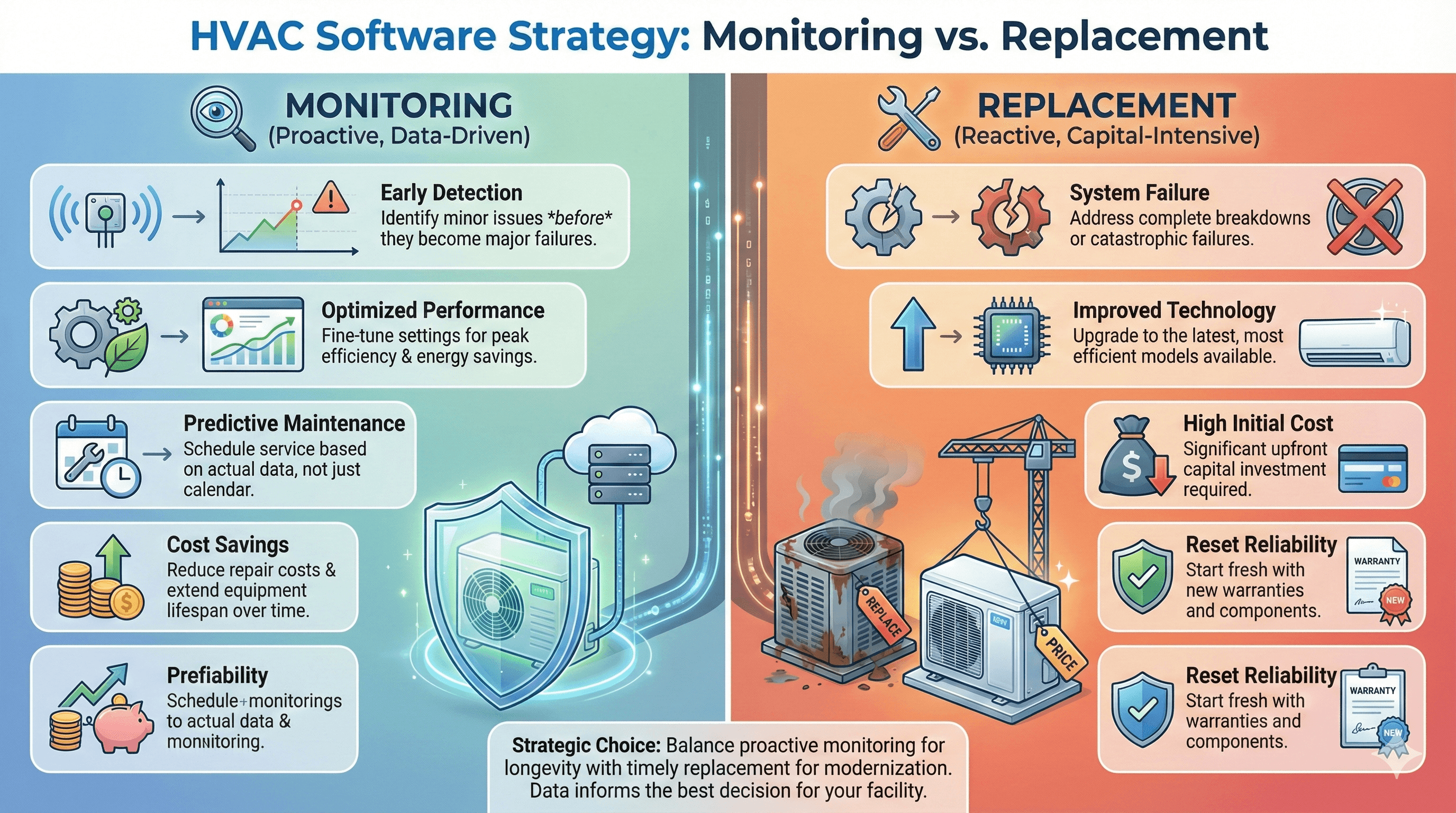
Replacement vs. Monitoring: The Critical Distinction
This is where most HVAC business owners get confused. Let's break it down clearly:
Replacement Approach
Tools that replace ServiceTitan:
- •Require migrating all customer data
- •3-6 month implementation timeline
- •Retraining entire staff on new system
- •High switching costs and disruption
- •Often similar or higher pricing
Monitoring Approach
Tools that monitor ServiceTitan:
- •Plug into existing ServiceTitan setup
- •1-3 day setup, zero workflow disruption
- •Staff keeps using ServiceTitan exactly as before
- •No switching costs, cancel anytime
- •Fraction of platform replacement cost
The analogy: If ServiceTitan is your car's dashboard (speed, fuel, engine temp), monitoring is the warning lights that flash BEFORE problems become expensive. You don't replace the dashboard—you add sensors that catch issues early.
When to Replace ServiceTitan (Rare)
To be clear: Some HVAC businesses genuinely need to move off ServiceTitan. Here are the legitimate reasons:
- Cost-to-Value Mismatch: You're paying $60k/year but only using 20% of features. Smaller, simpler platforms like Housecall Pro or Jobber might fit better at $200-300/month.
- Complexity Overwhelm: Your team is small (2-5 techs), ServiceTitan feels like overkill, onboarding new staff takes weeks.
- Poor Support Experience: You're stuck in slow support queues, not getting the help you need to maximize the platform.
- Better Features Elsewhere: A competing platform has must-have capabilities ServiceTitan lacks for your specific niche.
Important: If you're happy with ServiceTitan's core functionality, don't migrate just because a sales rep promises "better revenue tracking." You can ADD revenue intelligence without REPLACING your entire operational backbone.
The Monitoring-First Approach for North Texas HVAC
Here's what makes sense for most DFW HVAC companies already using ServiceTitan:
The Intelligence Layer Strategy
Step 1: Keep ServiceTitan (Your Operational Core)
Continue using it for dispatch, invoicing, customer database, job tracking—everything it does well.
Step 2: Add Revenue Leak Monitoring (Your Early Warning System)
Layer on tools that watch ServiceTitan for revenue leaks: missed calls, slow callbacks, forgotten estimates.
Step 3: Get Alerts Before It's Too Late
Daily notifications when patterns emerge. Fix small problems before they become big losses.
Step 4: Make Data-Driven Decisions
Use real-time intelligence to optimize CSR coverage, callback processes, and estimate follow-ups.
The result: You get the revenue visibility you need WITHOUT the $300k migration headache, 6-month implementation timeline, or staff retraining chaos.
Real Example: Fort Worth HVAC Company
The Situation
Mid-sized HVAC company, 12 techs, $4.2M annual revenue. Using ServiceTitan for 4 years. Sales rep pitched them on a "better platform" promising improved revenue tracking for $45k/year.
The Question
"Should we migrate off ServiceTitan to get better revenue visibility?"
The Answer
No. They added revenue leak monitoring instead. Kept ServiceTitan. Got daily alerts on missed calls, slow callbacks, and idle estimates. Identified $31k in monthly leaks within the first audit.
Results After 90 Days:
- →$20k+ monthly revenue recovery sustained
- →Zero workflow disruption (staff never left ServiceTitan)
- →Cost: Fraction of platform replacement
The Decision Framework: Should You Replace or Monitor?
Use this simple framework to decide:
Ask Yourself:
1. Is ServiceTitan's CORE functionality the problem?
If dispatch, invoicing, and job management work fine → Monitor, don't replace
If those core features are broken or inadequate → Consider replacement
2. Is the issue VISIBILITY into revenue leaks?
If you're losing revenue to missed calls/callbacks/estimates → Monitor, don't replace
ServiceTitan isn't built for this—no platform is. You need monitoring.
3. Can you afford 3-6 months of disruption?
If no → Monitor, don't replace
Platform migrations during peak season = operational chaos
4. Are you just looking for better revenue tracking?
If yes → Monitor, don't replace
Add intelligence on top. Keep operations stable.
What North Texas HVAC Owners Are Choosing
In the DFW market, we're seeing a clear pattern: HVAC companies that are happy with ServiceTitan's operational features are choosing to monitor rather than replace.
Why?
- They get the revenue visibility they need
- Without ripping out systems that work
- Without retraining staff mid-season
- Without $300k+ migration costs
- And they can cancel monitoring if it doesn't deliver value (no lock-in)
The boring truth: Sometimes the best solution isn't revolutionary. It's adding a small intelligence layer on top of what you already have.
Next Step: See What You're Missing in ServiceTitan
If you're using ServiceTitan and wondering whether you need to replace it or just monitor it better, here's an easy test:
Get a free revenue leak audit. We'll analyze 7 days of your ServiceTitan data and show you:
- How many calls ServiceTitan never saw (because they went unanswered)
- Your average callback time vs. DFW market benchmarks
- How many estimates are sitting in "Estimate Sent" status with zero follow-up activity
- Estimated monthly revenue impact
If the audit reveals that ServiceTitan itself is the problem (rare), we'll tell you. If the audit reveals you just need better visibility into what ServiceTitan already tracks (common), we'll show you that too.
ServiceTitan User? See Your Revenue Leaks
Free 7-day audit of your ServiceTitan data. Find out if you need to replace your CRM or just monitor it better. No cost. No commitment.
Get Your Free ServiceTitan Audit100% free. Works alongside ServiceTitan, Housecall Pro, and Jobber.
Related Articles
Why 25% of Maintenance Agreements Won't Renew
ServiceTitan tracks contracts, but are you tracking why 25% don't renew? The operational failures costing $50K+ annually.
Why North Texas HVAC Companies Lose $20k+/Month
Discover the 4 operational blind spots costing DFW HVAC companies thousands monthly in lost revenue.
4 Revenue Leaks During Peak HVAC Season
Summer heat and winter freezes amplify revenue leaks. Here's how to prepare before it's too late.
About North Texas Operations: We help DFW HVAC companies monitor ServiceTitan and Housecall Pro for revenue leaks—without replacing them. 100% North Texas focused. 0 platform migrations required. If ServiceTitan works for your operations, keep it. Just add intelligence on top.